LNReader is an open-source Android app for reading light novels. Under the hood, it has a plugin system - and once you understand how it actually works, you realize it's not really a "plugin system" at all. It's a full mini package manager: repository discovery, manifest fetching, installation, version tracking, lazy loading, isolated storage per plugin. The whole thing, embedded inside a React Native app.
Here's how it's built.
The Problem
There are hundreds of websites that host light novels, web novels, and fan translations. Some run WordPress with a specific theme. Some are bespoke PHP apps. Some are proper APIs. Some are ancient Blogspot pages that somehow still work. Every one of them has different HTML, different pagination, different chapter structure, different opinions about what a "title" even is.
Without an abstraction layer, you'd either hardcode support for every site (unsustainable) or limit users to a small curated list (bad for a community app that lives and dies by its source coverage).
Plugins give you a third option: a small shared agreement between the app and each source. Every source adapter answers the same basic questions: what novels are popular, what matches a search, what a novel page contains, and what a chapter contains. The chaos of the web stays inside the plugin. LNReader only ever sees clean, predictable data.
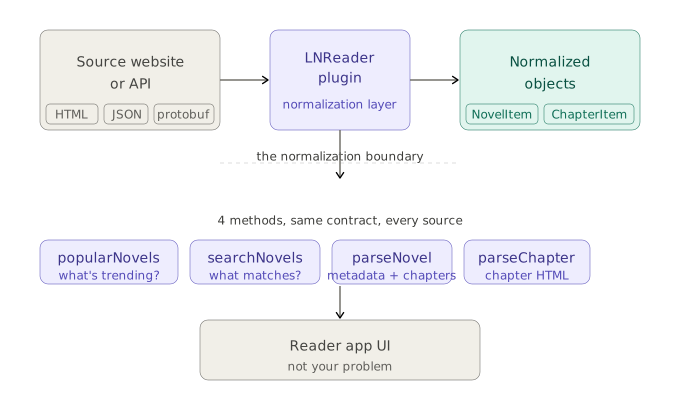
This boundary is the most important idea in the whole system. It doesn't matter if a site serves JSON, server-rendered HTML, paginated chapter lists, or protobuf responses. Whatever mess lives on the other side of that boundary is fully contained. The app never knows the difference.
The Plugin Agreement
A plugin has to answer four questions for LNReader:
popularNovels- what books are people browsing on this source?searchNovels- what books match this search?parseNovel- what metadata and chapters belong to this book?parseChapter- what should the reader show for this chapter?
Along with some metadata: a unique id, display name, base site URL, version, and an icon.
That's the whole deal. How a plugin gets those answers is entirely up to the source - DOM selectors, an event-driven HTML parser, a REST API call, whatever the site requires. The app only cares about the answers.
The Data Model
Plugins return three normalized shapes. A lightweight listing object with a name, path, and optional cover image. A richer novel detail object that adds author, genres, summary, status, and a chapter list. And a chapter entry type with a name, path, and optional release time.
Three types. The entire app is built around consuming those from whatever source the user has installed.
The Part That's Actually A Package Manager
Repositories As Package Sources
Repositories are just URLs - each pointing to a manifest file hosted somewhere on the web. LNReader stores registered repository URLs in a local SQLite table. When the app refreshes plugins, it fetches all manifests concurrently, merges the results, and deduplicates by plugin id.
That deduplication order matters: later-added repositories win on conflicts. Which means you can override a plugin from the default repository with a fork from your own. A power user feature hiding in plain sight.
The Manifest
Each manifest is an array of lightweight metadata entries - id, name, version, lang, a URL pointing to the raw compiled JavaScript artifact, and optional URLs for custom CSS and JS assets.
This is purely install-time metadata. It tells the app what exists and where to fetch it. The actual code hasn't been touched yet.
Installation: Dynamic Evaluation As A Runtime Loader
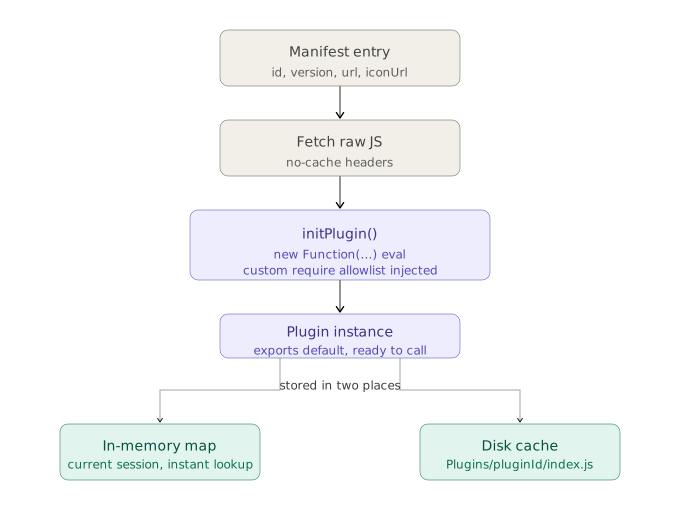
When you install a plugin, the app fetches the raw JavaScript from the manifest's artifact URL, then evaluates it using new Function(...) - essentially a scoped eval. The evaluated module is expected to export a default plugin instance.
Instead of a standard module system, plugins get a custom injected require that exposes only a curated allowlist: HTML parsing libraries, date utilities, encoding helpers, fetch wrappers, and plugin-scoped storage. No filesystem access, no arbitrary imports. The allowlist defines exactly what a plugin is permitted to use, and anything outside it simply isn't available.
That may sound alarming, because it is still downloaded code being run inside the app. The guardrails matter, but they are not magic. The trust model comes back later.
Once initialized, the plugin lands in two places: an in-memory map for the current session, and a file on disk at a well-known path keyed by plugin ID. Optional custom JS and CSS assets are written alongside it.
Lazy Loading Across Restarts
getPlugin() checks the in-memory map first. If the plugin isn't cached - on a fresh app start, for instance - it reads the plugin's JS from disk, re-evaluates it, and populates the cache.
This means installed plugins work completely offline. The source repository never needs to be reachable again after installation. The compiled JS is yours, cached locally, loaded on demand. Exactly like a package cache.
The Installed Registry
App-facing state lives in MMKV, React Native's fast key-value store. It tracks available plugins from repos, locally installed plugins, and user preferences like pinned and last-used plugins.
Version management is baked in: when a repository publishes a higher version than what's installed, the plugin gets flagged, and the UI surfaces an update option. If you have version 1.2.0 installed and the repository now lists 1.3.0, LNReader can show that an update is available. Updating just re-fetches and re-evaluates the new artifact. Uninstall is clean - MMKV state, plugin-scoped storage, and the local JS file all get removed together.
Extras: Filters, Settings, and Custom Assets
A few things that round out the system.
Filters let plugins expose browsing controls - dropdowns, toggles, checkboxes - that feed into the browse call. The plugin declares what filter options exist; the app renders them and passes selected values back. LNReader doesn't need to know anything about a source's specific filtering semantics.
Plugin settings handle user-specific configuration - credentials or server URLs for self-hosted sources. The plugin declares its settings schema; LNReader renders them as form inputs and persists the values through plugin-scoped storage.
Custom assets let plugins ship reader-level CSS and JS. During reading, the WebView injects these as local file references - useful when a source's chapter HTML needs cleanup or special styling that belongs to the plugin, not the app.
Multi-Source Generation
Some novel sites run on the same engine - the same WordPress theme, the same backend framework. Writing nearly identical plugins for dozens of such sites by hand would be tedious and error-prone.
The solution is code generation. A template combined with a JSON config describing each source gets fed into a generator that emits real plugin files. Those generated plugins flow through the normal build and publish pipeline like any hand-written plugin. The abstraction is invisible to the app. Generated file names include the template name, so the lineage stays traceable if you're ever spelunking the repo.
Stepping Back
What looks like "a plugin system for a novel reader" is a surprisingly complete distribution and runtime stack:
| Concept | LNReader equivalent |
|---|---|
| Package source | Repository URLs in SQLite |
| Package index | JSON manifest per repo |
| Package artifact | Raw compiled JS |
| Package loader | Dynamic eval via Function(...) |
| Local cache | Plugin JS files on disk |
| Installed registry | MMKV state |
| Lazy module resolver | getPlugin() |
Each piece maps cleanly. And taken together, they make the app remarkably resilient - plugins install once and work forever, independent of network state, independent of whether the original repo even still exists.
You could imagine solving this with a central backend: the app talks to one server, and that server talks to every novel site. That would make the app simpler, but it creates a different pile of problems. Someone has to host it, scale it, keep it online, absorb breakage from every source, and become the bottleneck for every new adapter the community wants to add.
This pattern - embedding a purpose-built package manager inside an app rather than relying on that central backend - shows up more than you'd expect in community-driven media apps. It's a practical response to a real constraint: the sources are too numerous, too varied, and too volatile to be managed any other way. The only sustainable architecture is one that pushes the source-specific complexity to the edges and keeps the core app blissfully ignorant of it.
The Trust Model
One thing worth sitting with: plugins are dynamically evaluated JavaScript downloaded from the internet. The custom require setup limits what they can access, but this is still fundamentally a trust-based extension model. A plugin runs with the permissions of the app.
This is a deliberate tradeoff. Hermetic sandboxing would mean less flexibility - and for a community-driven app where extensibility is the product, that's the wrong call. The allowlist does meaningful work to reduce the attack surface, but the real mitigation is social: repositories should be treated like software sources, not passive data feeds. The model works because the community treats it that way.
It's the same tradeoff npm made. It's the same tradeoff browser extensions made. When flexibility is the point, you accept the trust model and build the tooling to make abuse hard. LNReader's approach - curated require, disk isolation, per-plugin storage namespacing - is a reasonable implementation of that philosophy for a mobile app.